PVP (Player VS Player) is a way of how Players test their skill with other Players in Minecraft, not only their Building skills but also their Combat skills. When a Player is playing PVP with another Player, there are a few tricks that you need to know that would make you Win easily. (Note: Some of these tricks may require some practice to implement it perfectly on the Battleground. Youtuber OMGChad made a short video about these tricks. Don't forget to subscribe to him
Showing posts with label Minecraft. Show all posts
Posted by
Atillio Dwien
0
comments
Minecraft tip #5 Secret entities
Use these Commands to summon secret Mobs/Entities that you will never find anywhere in Minecraft
Hope you enjoyed :-)
- Tamed Zombie Horse
- Tamed Skeleton Horse
- Giant Zombie
- The Killer Bunny (spawning this mob in survival is dangerous so spawn it at your own risk)
Hope you enjoyed :-)
Posted by
Atillio Dwien
10
comments
Minecraft Tip #4 secrets
Here are some things you might/might not know about Minecraft
- You can flip animals upside-down by naming them "dinnerbone" or "grumm"
- Zombies and Skeletons don't burn on soulsand
- You can make lava and water stream together by placing either one 1 block higher than the other
- Cactus can destroy items
- There is 1 in a 10.000 chance that the title screen will say "Minceraft" instead of "Minecraft"
- You can place paintings over doors and walk through them
- You can make sheeps change their colors constantly by naming them "jeb_" (must have the underscore)
- You cannot see a players name through a chest even if they are not crouching
- A creeper's body model is actually a glitched version of a pig's body model. But because Notch liked the look of it, he gave it a green color and a creepy sound, thus the famous creeper was born.
- In an unused area for the zombie pig man texture, the words "THX XAPHOBIA" can be seen. This was written by Notch to give credits and thanks to the original creator of the texture, XaPhobia.
Posted by
Atillio Dwien
5
comments
Minecraft Tip #3 Colored beacons
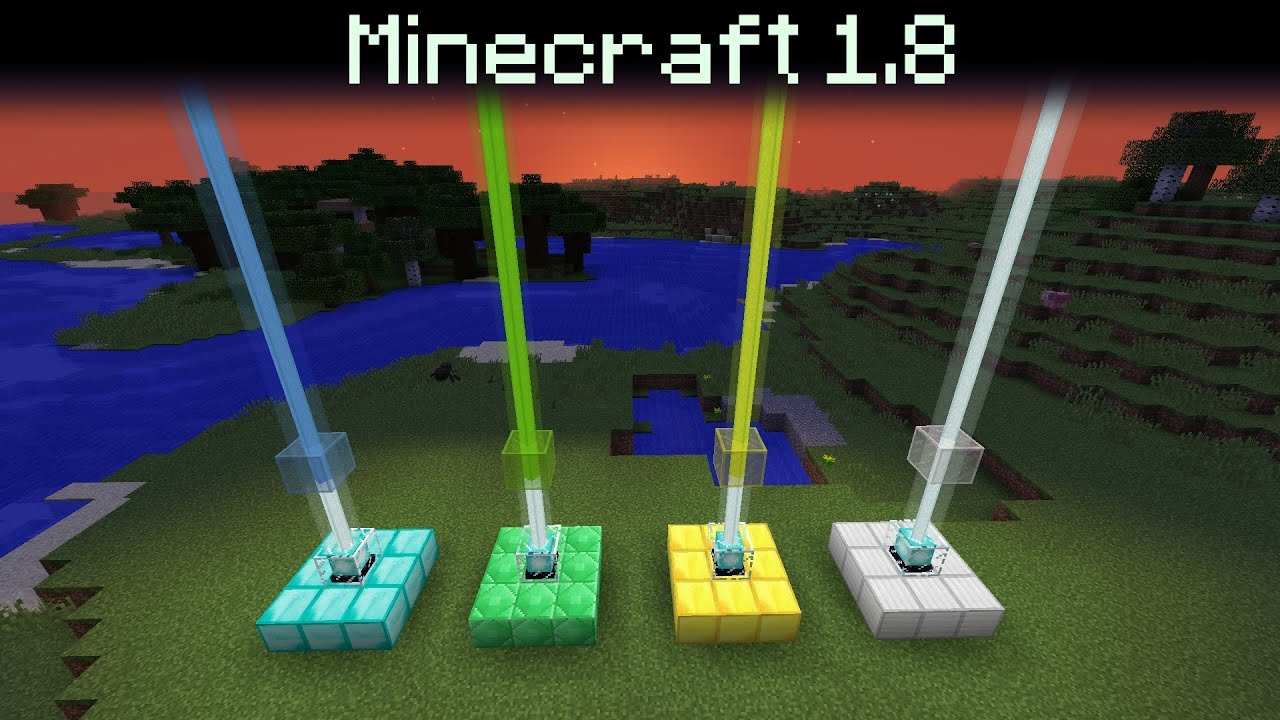
You can change the color of the beams on your beacon by using stained glass. The colors can also be combined by using multiple stained glass.
<== You have to put the stained glass on top of the beacon
You can also make the beacon constantly change its colors by using redstone contraptions
watch this video to know how to make it.
Posted by
Atillio Dwien
0
comments
Minecraft Tip #2 Tool durability
Tool durability
The values in this table are the number of useful actions that a tool can perform.
| Gold | Wood | Stone | Iron | Diamond | |
|---|---|---|---|---|---|
| Durability | 33 | 60 | 132 | 251 | 1562 |
Gold tools destroy most blocks faster than any other type of tool. However, they can only collect blocks that can be harvested with wooden tools.
The next table shows how many uses remain in a tool, at the first moment its durability bar appears empty.
| Gold | Wood | Stone | Iron | Diamond | |
|---|---|---|---|---|---|
| Durability | 2 | 3 | 6 | 10 | 61 |
- Using a sword to mine blocks (including some for which they are the fast tool) counts as two uses.
- Using a pickaxe, axe or shovel on the wrong type of block only counts as one use (but is slow), but attacking mobs counts as two.
- A hoe does not lose durability either mining blocks nor attacking mobs (but in either case, it's no better than bare hands). Its durability applies only to tilling dirt.
- Carrot on a Stick has a durability of 26, Flint and Steel and Fishing Rods have a durability of 65, Shears have a durability of 239, and Bows have a durability of 385.
- Like a hoe, each of these use durability only when used in their normal fashions.
- Successfully catching a fish counts as one use of a fishing rod, reeling in the line while it is stuck to a block counts as two uses, and reeling in any mob counts as three uses. Casting into water and reeling in an "empty hook" does not cost durability.
- Shears are only damaged when shearing a sheep and when breaking cobweb, leaves, tall grass, tripwire, and vines blocks.
- Items with an Unbreaking Enchantment do not always lose durability when used; for a given enchantment level, the chance that they will use durability is 1 in (1+level). The result is that they will last an extra level times their original durability, give or take a few.
Read more at:
Posted by
Atillio Dwien
0
comments
Mineraft Tip #1 Armor durability
Armor Durability
Armor durability is based on your armor types(head, torso, legs, feet) and materials(leather, iron, chain, gold, diamond) of the armor that you're wearing. Every time you take damage, you lose 1 point of your armors durability.
Armor durability only decreases when the player is taking damage from:
- Direct attacks from players or mobs
- Getting hit with flying projectiles(snowballs, fireballs from either ghasts or blazes, arrows, etc)
- Touching blocks that can harm the player(lava, cactus, or fire)
- Explosions
- Thorns enchantment
- Suffocating
- Drowning
- Taking fall damage
- Falling into the void
- Poisoning
- Damage from potion of harming
- Ongoing damage by being on fire
The Table below represents the armor points of each armor pieces based on their materials
| Leather | Gold | Chainmail | Iron | Diamond | |
|---|---|---|---|---|---|
| Helmet | 56 | 78 | 166 | 166 | 364 |
| Chestplate | 81 | 113 | 241 | 241 | 529 |
| Leggings | 76 | 106 | 226 | 226 | 496 |
| Boots | 66 | 92 | 196 | 196 | 430 |
you can read more at
Posted by
Atillio Dwien
7
comments
How to do the Duplication Glitch in Minecraft PE
This Glitch still works on Minecraft PE versions 0.9.0 - 0.10.4
All you need to do is just follow these instructions:
- Make a small chest (I don't know if it works with the Large ones)
- Put all of your items in another chest (put them all in your normal items chest, but not the chest you're going to use for this glitch) But keep the item you want to duplicate (only 1 item)
- Put the item you want to duplicate in the small chest
- Go back to the menu screen (not the home screen)
- Go back to your world
- Take the item from your chest
- Quit the game
- Remove the game from your Taskbar (The Multitasking bar)
- Play Minecraft PE
- Go back to your world and take the item in the small chest(There should be another one in your inventory and another one in the small chest)
- Then if you want more, press and hold on the empty box beside your item's box in the quickbar
- A "Pop" sound should play and another one of your item (the same item) will be thrown out of your inventory
- Repeat Step 11-12 until you've reached the amount of items you wanted
- After your item is full, repeat the whole step
I hope this trick was helpful to you
Subscribe to:
Posts (Atom)